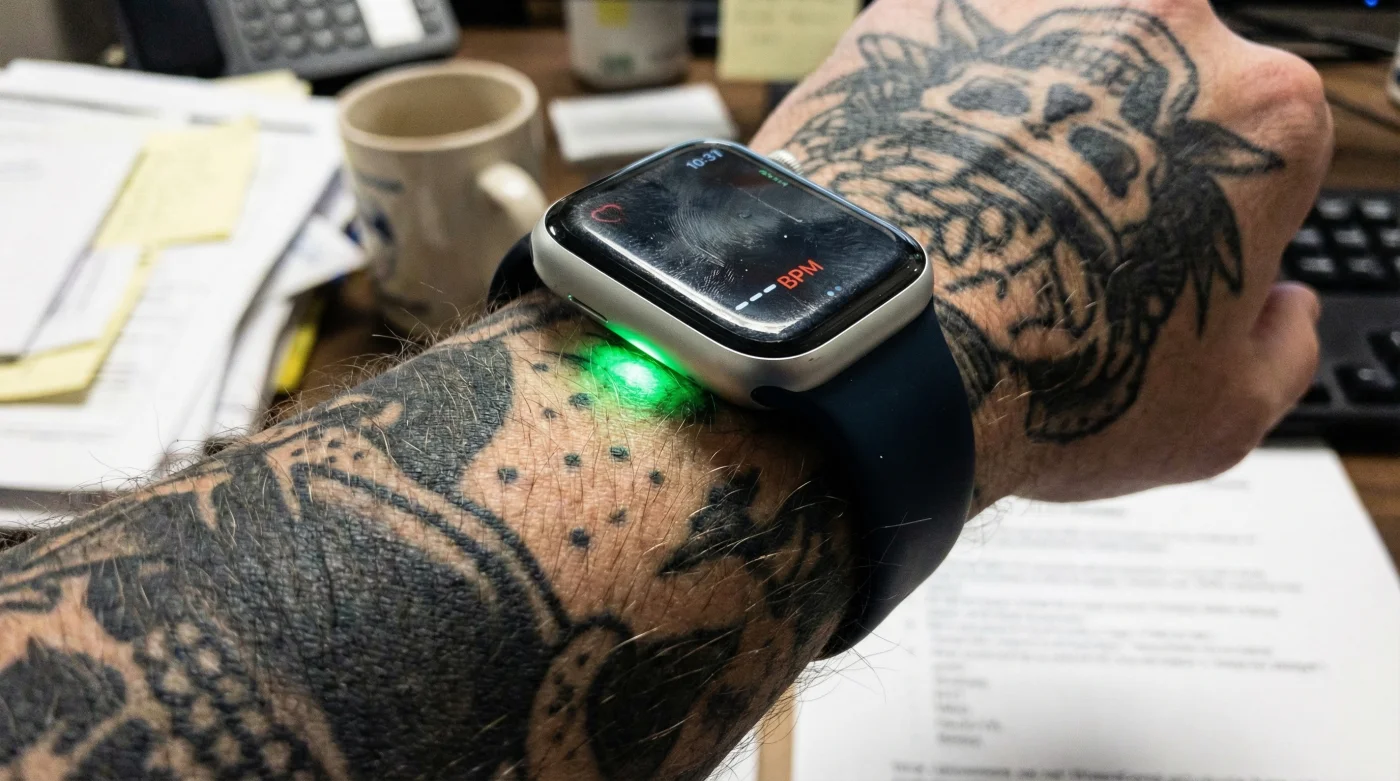
You just finished a grueling HIIT session, dripping with sweat, expecting the satisfaction of closing your rings and analyzing your peak performance metrics. You glance at your wrist, anticipating a detailed heart rate graph, but instead, you see grey gaps in the data or a resting heart rate reading that makes no physiological sense given your current exertion. You check the fit, wipe the sensor, and restart the device, but the glitch persists. For thousands of users, the hardware isn’t broken, and the software isn’t buggy—the problem lies in a permanent aesthetic choice that is quietly rendering top-tier wearable technology useless.
This is the "Expert Failure" of the wearable industry: a technological blind spot where advanced biometric sensors meet the reality of human body modification. While Apple Watch engineering is a marvel of modern health tracking, it relies on a specific light-based mechanism that encounters a catastrophic wall when faced with saturated ink. Before you return your device or book a Genius Bar appointment, you need to understand the hidden physics occurring between your epidermis and the green LEDs on your wrist.
The Physics of the Failure: Photoplethysmography Explained
To understand why your tattoo is the culprit, we must first dissect the mechanism the Apple Watch uses to read your vitals. It utilizes a technology called photoplethysmography (PPG). This technology is based on a very simple fact: blood is red because it reflects red light and absorbs green light. The Apple Watch uses green LED lights paired with light-sensitive photodiodes to detect the amount of blood flowing through your wrist at any given moment.
When your heart beats, the blood flow in your wrist—and the green light absorption—is greater. Between beats, it is less. By flashing its LED lights hundreds of times per second, the Apple Watch can calculate the number of times the heart beats each minute. However, this system relies on the skin being a relatively translucent medium that allows light to penetrate to the blood vessels and bounce back to the sensor. This delicate optical dance is exactly where ink creates chaos.
Understanding the light spectrum is crucial, but knowing exactly which users are most at risk helps diagnose the issue instantly.
Table 1: The Risk Profile – Who is Affected?
| User Profile | Interference Risk Level | The Technical Why |
|---|---|---|
| Clean Skin / Light Tattoos | Low / Negligible | Light penetrates easily; sparse ink dots allow sufficient reflection for the photodiodes. |
| Blackout / Tribal Work | Critical Failure | Dark pigments (black, blue) absorb the green LED light entirely, preventing any signal return. |
| Red / Warm Colors | Moderate to High | Red ink can reflect red light but absorbs green light unpredictably, causing erratic data spikes. |
| Scar Tissue / Cover-ups | High | Thickened dermis and high pigment density scatter light, confusing the algorithmic baseline. |
The severity of the blockage depends heavily on saturation, but even a small, strategically placed design can disrupt the sensor’s functionality completely.
Why Ink Stops the Sensor: The Science of Saturation
- Whoop Fitness Straps fail reading biometrics through traditional Japanese sleeves
- Professional spray tans permanently stain white tattoo highlights a muddy yellow
- Daily sea salt soaks drastically accelerate fresh cartilage piercing migration
- Zinc Oxide Sunscreen permanently leaves white casts on blackwork tattoos
- Age fifty skin thinning permanently blurs delicate cursive collarbone script
This results in a failure of the "signal-to-noise" ratio. The sensor increases the LED brightness to compensate for the lack of return signal (which drains your battery faster), but eventually, the software interprets the lack of consistent reflection as the watch not being on a wrist at all. This is why features like Wrist Detection often fail, causing the watch to lock itself repeatedly during workouts.
Table 2: Light Absorption Mechanics
| Variable | Standard Operation | Tattoo Interference |
|---|---|---|
| Light Source | Green LED (520–570 nm) | Green light is highly absorbed by dark pigments. |
| Sampling Rate | Hundreds of flashes per second | Sensor fails to receive return signal, reducing sampling rate to save power or erroring out. |
| Signal Path | LED -> Epidermis -> Dermis -> Blood -> Photodiode | LED -> Epidermis -> Ink Blockage -> Signal Terminated. |
If you suspect your ink is the culprit, you need to run a quick diagnostic check to confirm it isn’t a hardware defect.
Diagnostic Guide: Is It the Ink or the Tech?
Before investing in accessories to fix the problem, verify the root cause. Use this troubleshooting matrix to determine if your Apple Watch is struggling with your body art.
- Symptom: Watch locks itself repeatedly during use.
Cause: Wrist Detection fails because the sensor cannot "see" the skin through the ink, assuming the watch has been removed. - Symptom: Greyed out Heart Rate in the Health App.
Cause: Photodiodes received zero return light signal for extended periods (Total Occlusion). - Symptom: Heart rate reads 180bpm while sitting still.
Cause: Light scattering. The sensor is picking up external ambient light leaking in from the sides rather than blood flow data. - Symptom: Battery drains twice as fast as normal.
Cause: The LED sensors are stuck in "High Power" mode, trying to penetrate the ink barrier.
Once you have confirmed that your tattoo is the bottleneck, you have three distinct paths to restore functionality.
The Authority Solutions: Workarounds and Fixes
Apple has acknowledged this limitation in support documentation, noting that "permanent or temporary changes to your skin, such as some tattoos, can also impact heart rate sensor performance." However, they do not offer a software fix because this is a hardware limitation of optical physics. Therefore, the solutions require user adaptation or external hardware.
The most common reliable fix is shifting the hardware. Moving the watch to the other wrist (if it is tattoo-free) is the simplest solution. If both wrists are heavily tattooed, users must look toward the underside of the wrist, where skin is often lighter and ink less saturated, though this can be uncomfortable for typing. For those unwilling to compromise on placement, technology pairing is the only route.
Table 3: The Protocol for Tattooed Users
| Method | Effectiveness | What to Look For (The Fix) |
|---|---|---|
| The Bluetooth Chest Strap | 100% Reliable | Polar H10 or Garmin HRM. These bypass the wrist optical sensor entirely and send electrical signal data directly to the Watch via Bluetooth. |
| The Epoxy Sticker Trick | Experimental (50-70%) | Placing a clear, 1-inch epoxy bottle cap sticker over the sensor can sometimes simulate skin contact, tricking the Wrist Detection into staying active. |
| Settings Modification | Partial Fix | Turn off Wrist Detection in the Watch app (Passcode > Wrist Detection). Warning: This disables Apple Pay and standby locking security. |
| Forearm/Bicep Bands | High (90%+) | Optical bands like the Scosche Rhythm+ use similar tech but can be placed on the bicep where tattoos are often less dense. |
Ultimately, while the Apple Watch is the gold standard for consumer health tracking, it is bound by the laws of physics. If your ink is saturated and dark, optical sensors will struggle. The professional recommendation is to pair your watch with a Bluetooth chest strap for workouts to ensure medical-grade accuracy without sacrificing the aesthetic of your ink.