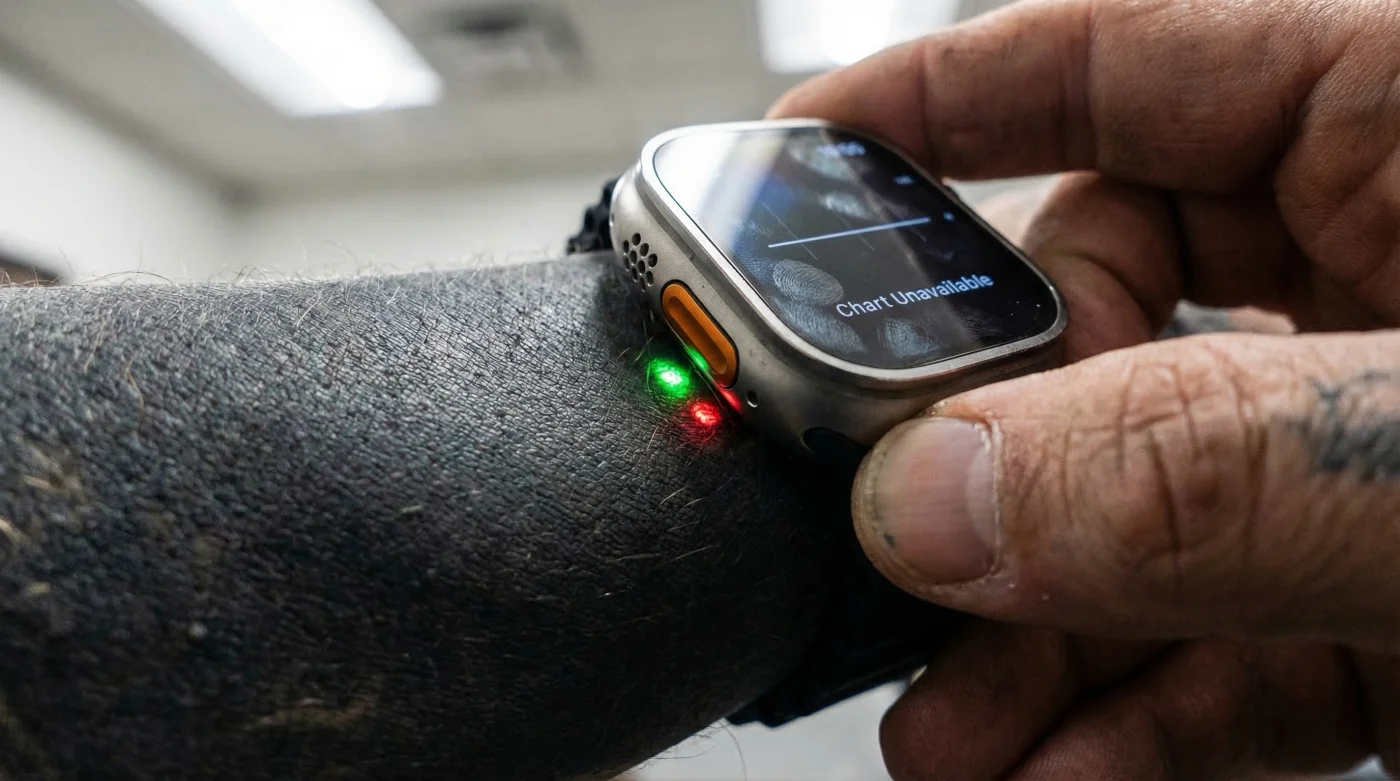
You have just strapped on the most advanced piece of wearable technology on the market, ready to conquer your fitness goals with unparalleled precision and metrics. With its aerospace-grade titanium case and cutting-edge biometrics, users expect the highly lauded Apple Watch Ultra to conquer any extreme environment without breaking a sweat. But for a rapidly growing number of elite athletes and tech enthusiasts, their rugged, premium smartwatch is failing to track even the most basic vital signs, leading many to believe they have purchased a fundamentally defective unit. Studies prove that this silent tracking failure is not a software glitch or a manufacturing error, but rather a profound physical obstruction hiding in plain sight on the user’s own body.
The hidden culprit destroying your carefully tracked metrics is not extreme temperatures, high altitude, or a loose band, but rather a deeply personal aesthetic choice that completely blinds the device’s internal tracking mechanisms. If you are struggling with dropped heart rate readings, wildly inaccurate calorie burns, and sudden, infuriating security lockouts mid-run, the real issue lies in how a specific spectrum of light interacts with your skin’s surface. The ultimate solution requires understanding a deeply buried technical mechanism and utilizing a strategic bypass that the manufacturer rarely advertises publicly.
The Intersection of Body Art and Biometrics
Experts advise that modern wearables operate on highly specific optical parameters that assume a relatively uniform biological canvas. The explosion in popularity of heavy blackout sleeve tattoos has created an unforeseen clash between high-end body art and advanced health tracking. When a user invests heavily in an intricate, dark sleeve, they are fundamentally altering the reflective properties of their epidermis and dermis. Because smartwatch technology relies on bouncing light through these skin layers to read blood flow, inserting a dense wall of dark pigment effectively acts as a blackout curtain. Fitness enthusiasts who push their bodies to the limit are suddenly finding their expensive equipment crippled, unable to register active calories, blood oxygen levels, or even basic physical contact.
| User Profile | Skin Modification | Impact on Watch Metrics | Primary Consequence |
|---|---|---|---|
| Endurance Runners | Solid Blackout Forearm Sleeve | Complete loss of optical heart rate and automatic workout pausing. | Inaccurate VO2 Max and dropped pacing data. |
| Strength Trainers | Dense Tribal or Shaded Ink | Intermittent heart rate drops during heavy wrist flexion. | Underreported calorie burn and erratic recovery metrics. |
| Daily Health Trackers | Full Color or Dark Watercolor Sleeves | Frequent passcode prompts and failed wrist-detection lockouts. | Missed notifications and broken sleep tracking. |
- Whoop Fitness Straps fail reading biometrics through traditional Japanese sleeves
- Professional spray tans permanently stain white tattoo highlights a muddy yellow
- Daily sea salt soaks drastically accelerate fresh cartilage piercing migration
- Zinc Oxide Sunscreen permanently leaves white casts on blackwork tattoos
- Age fifty skin thinning permanently blurs delicate cursive collarbone script
How Photoplethysmography Gets Blocked
To grasp why your device is failing, you must understand the science of Photoplethysmography (PPG). The Apple Watch Ultra utilizes a sophisticated sensor array on its ceramic back, featuring highly calibrated green LEDs, red LEDs, and infrared sensors. When your heart beats, blood flow in your wrist expands, absorbing more green light; between beats, it absorbs less. The green LEDs flash hundreds of times per second, emitting light precisely at the 515-nanometer wavelength to calculate this expansion. However, heavy black tattoo ink, which sits permanently in the dermis layer of the skin, acts as a hyper-efficient sponge for this exact light frequency. Instead of reflecting the green light back to the watch’s internal photodiodes to be converted into actionable data, the dense, dark pigment absorbs the light almost entirely.
- Symptom: Watch constantly asks for a passcode during active workouts = Cause: The infrared sensors used for basic Wrist Detection cannot penetrate the black ink to verify skin contact, causing the internal security system to assume the watch has been removed.
- Symptom: Heart rate chart shows massive gaps or flatlines = Cause: The green LEDs are firing at full capacity, but the dark pigment in the dermis is absorbing the 515nm light, preventing any reflection from reaching the photodiodes.
- Symptom: Blood Oxygen (SpO2) readings fail repeatedly = Cause: The red LEDs (operating at 660nm) and infrared light (850nm) require a clean reflective bounce from the blood vessels, which is scattered and muted by heavy heavy shading.
| Sensor Element | Operating Wavelength | Function | Interaction with Heavy Black Ink |
|---|---|---|---|
| Green LED | 515 nm | Active Workout Heart Rate Tracking | Over 90% light absorption by dark pigment; almost zero reflection to diodes. |
| Red LED | 660 nm | Blood Oxygen / SpO2 Tracking | Severe light scattering; unable to accurately measure blood color changes. |
| Infrared Sensor | 850 nm | Background Wrist Detection / Security | Blocked entirely by dense ink; triggers automatic device lockouts. |
Once you realize your skin’s customized pigment acts as an impenetrable void for these optical sensors, you must pivot to proven workarounds to instantly reclaim your biometric data.
Strategic Workarounds and the Progression Plan
For those who refuse to compromise on either their blackout tattoos or their data integrity, there are targeted, actionable solutions. The most immediate, albeit controversial, diagnostic fix is the epoxy sticker bypass. By applying a clear, 25-millimeter round epoxy resin sticker directly over the sensor array of the Apple Watch Ultra, you slightly alter the focal length and reflection angle of the infrared sensors. This subtle 1 to 2-millimeter gap forces the sensor to read the reflective surface of the sticker as ‘skin contact,’ completely bypassing the infuriating auto-lock and passcode prompts. However, while this restores basic functionality and notifications, it will not accurately restore your heart rate data because the green LEDs are still fighting the black ink below.
To achieve absolute biometric supremacy, the ultimate progression requires outsourcing your data collection. Experts advise disabling the watch’s internal wrist detection via the settings menu, which prevents the constant locking, and pairing the device with a dedicated Bluetooth chest strap monitor. A high-quality chest strap tracking at 2.4 GHz utilizes electrical impulses (electrocardiography) rather than optical light to track your heart rate, rendering the ink completely irrelevant. By strapping a monitor directly over your sternum, you feed flawless, real-time cardiovascular data seamlessly into your watch’s interface.
| Solution Phase | What to Look For (Quality Markers) | What to Avoid (Failure Risks) |
|---|---|---|
| Phase 1: Basic Watch Usability | Clear, dome-shaped 25mm epoxy resin stickers. | Opaque tapes or flat plastic that refracts light incorrectly. |
| Phase 2: Location Shifting | Moving the watch 2 to 3 inches up the arm to a skin patch with lighter or zero ink. | Wearing the watch too loose, causing extreme friction and sensor light leakage. |
| Phase 3: Hardware Outsourcing | Bluetooth 4.0 or ANT+ Chest Straps utilizing ECG tracking. | Optical armbands, as these suffer the exact same PPG failure on tattooed skin. |
Mastering these targeted hardware bypasses ensures that your personal aesthetic choices will never again compromise your elite fitness tracking.